Posts

Showing posts with the label Atmega328p

SN76489 Arduino MIDI player

Image
I've been thinking about retro 8-bit computers recently and came across the audio chip SN76489  ( datasheet ), which has been used in the BBC Micro , Sega Genesis and Master System (among many others ).  The chips are capable of generating 3 independent frequencies simultaneously, as well as a 4th channel for noise.  They seemed easy enough to interact with, using a write pulse to load commands into the chip in a parallel-fashion.  I thought it would be fun to hook one up to an Arduino and play some retro game MIDI files through them!  It would be easy to take a few and make a MIDI synthesizer out of them too. All code for this project can be found at my Github here:  https://github.com/shepherdingelectrons/SN76489_player It's easy to pick up a few cheaply from the usual sort of places, so I bought a pack of 5, and then had a read through the datasheet , which is always fun!

PS2 controller as a radio controller!

Image
Turning a PS2 controller into a wireless radio controller with Arduino Mini and an nRF24l01 radio module I have previously described a project to transmit PS2 controller signals by radio .  The project featured an Arduino Nano that read the PS2 signals and transmitted them with an nRF24l01 module.  Recently I have been inspired to incorporate the battery, charging circuit and Arduino right into the controller - heavily inspired by this project here:

Height and vertical velocity Kalman filtering on MS5611 barometer

Image
Height and vertical velocity from a MS5611 barometer Steps towards vertical flight control This isn't a post explaining how Kalman filters work, I assume some working knowledge.  Instead I wanted to record the process of developing a Kalman filter to derive both the height and the vertical velocity of a quadcopter using a MS5611 barometer, as it may be useful to others.  After recording some flight data on my quadcopter EEPROM, I then spat the output to a PC for post-processing and model training.  In Python I used a Kalman class to generate the following Kalman filter ( Wikipedia: Kalman filter ) based on the barometric height data.

The Fast and the Furious World (of Trigonometric Functions on ATMega328)

Image
Atan2 algorithms - speed vs accuracy Running trigonometric functions on an 8-bit AVR is inevitably going to be slow.  Floating point operations come with speed overheads and the most accurate algorithms usually come at a further timing price.  The arctangent function (atan/atan2) is ubiquitously useful, and especially so for Quadcopter's and robotics.  Briefly, an  atan2   function takes Y and X as arguments and works out which quadrant the tangent angle is in, and uses that to call a corresponding  atan   function.  I have been investigated the timings of various trigonometric functions on an ATMega328p chip running at 16 MHz, and in particular exploring 4 atan2 implementations and their trade-offs for accuracy.

Customising Optiboot

Image
I wanted to setup programming my custom Atmega328p board over Bluetooth.  Some have used the connection pin to control the Reset pin of the AVR.  However I want to use Bluetooth constantly, and only trigger a reset upon receiving a specific string sequence.  This requires tweaking the bootloader, using Optiboot as a basis: (1) Change Baudrate to be mutually compatible with Bluebooth and AVR. (2) Set an EEPROM byte in the main application, which could be read (and written) in the Optiboot routine. Setting up Optiboot in the Atmel environment: - Setup a project as usual in Atmel Studio - Copy files over from github to the project folder: optiboot.c, pindefs.h, stk500.h and boot.h. EDIT: It seems there is an AtmelStudio folder already set up on github . Setting baud rate to be compatible with AVR and Bluetooth module: 57600 bps - Insert #define BAUD_RATE 57600 (as required) into optiboot.c . - Compile and link project with following settings: Compiler Mis...

Radio control

Image
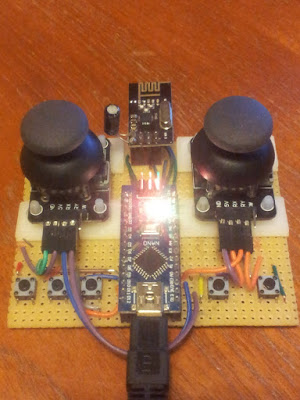
Accessing  quadcopter memory over radio The usual method of controlling quadcopters is to transmit a train of PPM signals from a radio transmitter, measure the length of the individual pulses on a microcontroller, via a radio receiver .  As part of my DIY ethos, and as a learning exercise, I have made the above controller with an nrf24l01 moduled and an Arduino Nano.  In a nutshell, the Arduino Nano captures the 2D joystick positions, used for yaw, throttle, pitch and roll, and the button presses.  A data packet is then sent by radio to the Quadcopter.  In fact there is a more powerful implementation going on.  What is interesting is how the controller sends data to the Quadcopter - it actually manipulates the memory directly on the Quadcopter AVR - how does it do that? Well, first of all the Quadcopter defines the memory addresses that the controller has access to by setting recording a pointer to the desired variable - note that the cast means...

Stuck in Atmega328 reset loop?

Image
Kill switch killing... but stuck in reset loop I wanted to add a kill switch to my quadcopter project so that in the case of crash/emergency, a button might be pushed on the radio controller, the quadcopter motors stopped and the flight controller chip is reset.  A good way of resetting an AVR is to invoke the watchdog timer and put the chip into an infinite loop - the watchdog times out and the chip is reset.  This is fairly straightforward when the kill/reset signal is received: #include <avr/wdt.h> void kill_drone(void) { USART_Pputstring(PSTR("Kill drone!\n")); wdt_reset(); wdt_enable(WDTO_15MS); while(1){}; } where the two watchdog handling functions are defined in avr/wdt.h. The AVR is reset, but keeps on reseting, initialising and resetting in an infinite loop... Watchdog Groundhog day! It turns out that the watchdog register settings are enabled, even after a reset !  To get around this, the watchdog must be turned off at the ea...

4 x 16 bit servo control on Atmega328p

Image
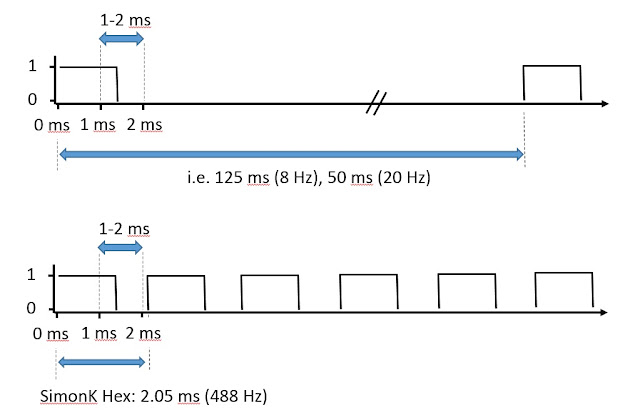
Controlling four motors with Atmega328 Timer1 One of the challenges in a quadcopter project is to correctly control the four thrust motors, via ESCs.  The control is effected by a pulse between 1-2 ms.  In ESC controllers, the refresh rate can be as low as 8 Hz or 20 Hz.  In quadcopters this refresh rate is far too slow - I have seen 100-200 Hz suggested as a suitable update frequency.  The "SimonK" hex is often reflashed to ESC controllers, as it has a refresh rate of approximately 488 Hz, very close to the theoretical refresh limit of just below 500 Hz. Algorithm idea Using the Atmega328 chip, we have only one 16-bit timer available, Timer 1.  Of course there are two other timers, but they are 8 bit timers, and I really want to stick to the resolution of the 16-bit timers.  We could consider using an AVR with four 16-bit hardware timers and use the four timer output pins, but it is interesting to see what can be done with just one.  So we ...

Programming Atmega328p chip wirelessly with nRF24L01+ module - Part II

Image
Fitting nRF24L01+ code into a bootloader A brief follow up to an earlier  post .  I previously had a system working whereby I was able to program an Atmega328p chip, using a connected Arduino Nano, but crucially using an nRF24L01+ module rather than a wired UART/PC connection.  What I really wanted however was to remove the Arduino Nano, and to program the MCU chip 'directly' by use of a bootloader with nRF24L01+ code to replace with the usual UART functionality.  I thought initially that I wouldn't be able to cram the radio module code into a bootloader, but in fact it wasn't too difficult.  I used Optiboot as a starting point and implemented bi-directional radio control within the bootloader.  I think it ended up being less than 1024 words (2048 bytes). I'm not an expert here - but I had to modify the compiler and linker parameters to get things to work: Compiler flags: -g -Wall -Os -fno-split-wide-types -mrelax Linker flags: -Wl,-section-s...

Disassembling Arduino generated code

Image
Johnny Five... No disassemble! I recently had need to work out how many clock cycles certain functions in my code took to execute, so it was time to find the HEX file and disassemble back to the ASM instructions.  In the Arduino environment you are shielded from getting your hands dirty with the generated compiler files, but they can be located in a temporary directory in Windows, found under: C:\Users\ USERNAME \AppData\Local\Temp\build XYZ .tmp where " USERNAME " is your ... user name and XYZ is some long integer that Arduino comes up with.  Make sure you have recently compiled your code in Arduino - the folders are deleted or wiped when you exit Arduino.  In this folder you'll find some interesting files, among them the .HEX file and .ELF files are of particular interest.  Either make a .BAT file or use the CMD prompt to execute the following commands. Disassemble from HEX We'll use avr-objdump, but we need to specify the architecture.  Find ...

Recovering ATMEGA328p chip from external clock fuse set

Image
A quick post of tragedy and triumph! Whilst breadboarding a new project with an Atmega328p chip (the heart of some of the Arduino ecosystem), I wanted to configure the AVR "fuses" (a desperately misleading term!) in order to use an external 16 MHz crystal, rather than the default internal 8 MHz oscillator.  This is straight forward and something I've done before.  Using the excellent fuse calculator , I wanted to get cracking and rushed in without double checking my fuse selection.  Big mistake!  I saw the option "external clock" (CKSEL=0000 SUT=00), and thought "great, that's it", also unselecting the CKDIV8 option (bit 7), generates the LOW fuse = 0xC0 and the HIGH fuse = 0xD9.  Two right mistakes here!  First of all the small one:  Selecting a box corresponds to setting the bit to '0', rather than '1', i.e. *unselecting/unticking* the CKDIV8 boxes will SET this bit as true (and divide the clock signal by 8).  It can't be...

Quadcopter control board - part 1

Image
Quadcopters and custom Eagle parts So I finally started my quadcopter project!  I want it to do certain things - for simplicity, I wanted to use cheap modules that you can find on Ebay or Amazon for the accelerometer, gyroscope and magnetometer.  I decided to add a micro USB port as a convenient 5 V power source, but quickly reasoned that full USB support with a FT232RL chip would be an easy way interact with the board and to spit out debug information.  So I picked up a bunch of micro USB with through-hole female ports from Ebay for next to nothing... then promptly realised they were completely non-standard and I would have to create my own custom Eagle part .  This turned out to be really quite simple.  With digital vernier calipers in hand the footprint part I created (inset) in a prototype design turned out to be near perfect - result! For the accelerometer and gyroscope I'm using a MPU-6050, and for the magnetometer, a HMC5883L module.  Esse...

Of Bootloaders and Nanos

Image
Restoring a Nano to a default Nano To use a Nano with default bootloader: Select "Arduino Nano" in the Arduino IDE and click "Burn Bootloader" under Tools (I'm using the USBtiny ISP). Alternatively use avrdude: Write ATmegaBOOT_168_atmega328.hex (found in Arduino/hardware/arduino/avr/bootloaders/atmega) with an ISP, i.e. avrdude -p m328p -c usbtiny -e -U flash:w:ATmegaBOOT_168_atmega328.hex Optiboot bootloader with a Nano To use the Optiboot which comes with the Arduino IDE (version 1.6.5) Add this to the boards.txt file in Arduino/hardware/arduino/avr ############################################################## atmega328o.name=[Optiboot] Arduino Duemilanove or Nano w/ ATmega328 atmega328o.upload.tool=avrdude atmega328o.upload.protocol=arduino atmega328o.upload.maximum_size=32256 atmega328o.upload.speed=115200 atmega328o.bootloader.tool=avrdude atmega328o.bootloader.low_fuses=0xff atmega328o.bootloader.high_fuses=0xde atmega328o...

Programming Atmega328p chip wirelessly with nRF24L01+ module - Part I

Image
I recently got my hands on a bunch of nRF24L01+ modules.  They're really easy to use and dirt cheap to pick up.  I followed this tutorial , which uses maniacbug's fantastic arduino library.  Although they are fairly ubiquitous as a radio transceiver of choice, I first heard about them on the excellent Julian Ilett's Youtube channel: I'm actually new to Arduino, but have messed about with programming chips and designing electronic devices for a couple of years.  I can see the attraction of Arduino, and I can see it's a great gateway for more fundamental electronics.  I picked up a couple of Arduino nanos (well, cheap Chinese knockoffs - they worked fine, incidentally), plugged them into the radios and installed some transmitting code on one (the joystick TX example in the  tutorial ) and some receiver code on the other - they worked great, out the box first time! Well that was just too easy!  The range was impressive too, at least twenty metres...

Atmega328 as an external EEPROM programmer

Image
Atmega328 as an external EEPROM programmer Need extra memory for an AVR project, but don't want to splash out on a expensive EEPROM chip programmer?  It's easy to build your own! The problem: You need additional EEPROM memory for an AVR project, for example to hold data that wouldn't otherwise fit in the native AVR's EEPROM.  But how to get that data onto the external EEPROM?   The solution: Well... y ou could use an EEPROM programmer, but they can be expensive, and besides, you probably only want to write a few chips and it feels like overkill.   Why not use your AVR to accept data from your computer and then burn it directly onto your EEPROM chip? PC --> AVR communication with USART The easiest way to get your AVR to talk to your PC is to use a USB USART converter.  I picked one up for next to nothing. The one I got was a CP2012 STC.   To use it, hook up the USB TX line to the RX pin on your AVR, and the RX line to TX pin on your AVR. ...